Get API Key
Many model providers offer an "OpenAI-compatible API". To configure ByteMind, collect these four values from your provider:
| Info | ByteMind field | Example |
|---|---|---|
| Provider type | provider.type | openai-compatible |
| API endpoint | provider.base_url | https://api.deepseek.com |
| Model ID | provider.model | deepseek-v4-flash |
| API key | provider.api_key | sk-... |
This page uses DeepSeek as an example. Other OpenAI-compatible providers follow the same general flow: find the API key first, then find the base URL and model ID.
Step 1: Open the Provider Console
Open DeepSeek Platform, sign in, and go to the API Keys page.
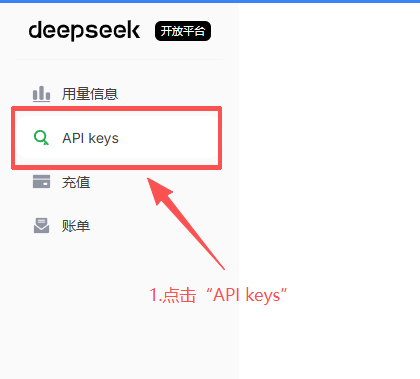
If you do not have usable balance, check your balance or top-up status first. API calls are usually billed by token usage. DeepSeek's official documentation says fees are deducted from topped-up or granted balance; prices may change, so use the Models & Pricing page as the source of truth.
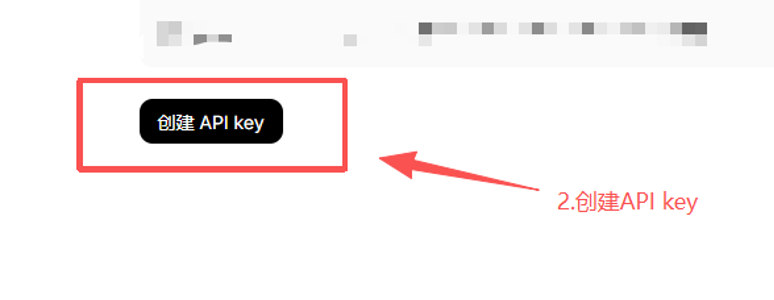
Step 2: Create an API Key
Create a new key on the API Keys page. After creation, copy the full key and store it somewhere safe on your machine. You will use it when configuring ByteMind.
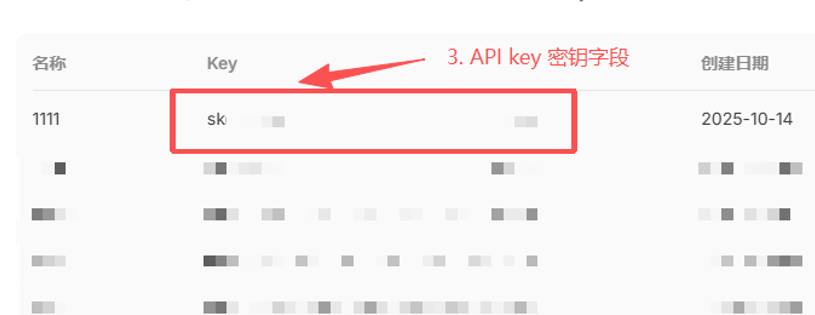
Do not share your API key with others, and do not commit it to a public repository. For beginners, writing it into your local ~/.bytemind/config.json is the most direct option; once you are comfortable, you can switch to environment variables.
Step 3: Read the API Docs
Open DeepSeek's First API Call documentation and focus on these fields:
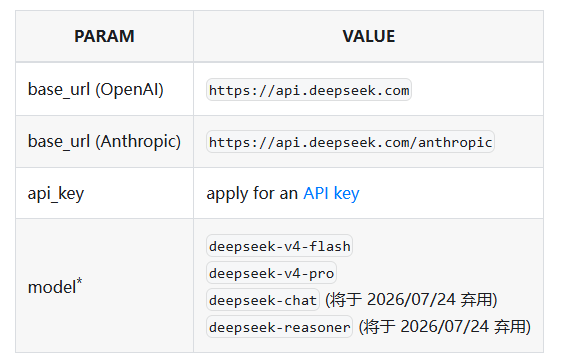
| Doc name | ByteMind config | DeepSeek example |
|---|---|---|
base_url (OpenAI) | provider.base_url | https://api.deepseek.com |
provider.type | openai-compatible | |
api_key | provider.api_key | The key you just created |
model | provider.model | deepseek-v4-flash |
As of 2026-05-07, DeepSeek's official docs recommend OpenAI-format models including deepseek-v4-flash and deepseek-v4-pro. The older model names deepseek-chat and deepseek-reasoner are marked for deprecation on 2026-07-24, so new configs should prefer deepseek-v4-flash (the web app's "Fast Mode") or deepseek-v4-pro (the web app's "Expert Mode").
Step 4: Write the ByteMind Config
Replace YOUR_DEEPSEEK_API_KEY with the key you just copied.
New-Item -ItemType Directory -Force "$env:USERPROFILE\.bytemind" | Out-Null
$config = @'
{
  "provider": {
    "type": "openai-compatible",
    "base_url": "https://api.deepseek.com",
    "model": "deepseek-v4-flash",
    "api_key": "YOUR_DEEPSEEK_API_KEY"
  }
}
'@

$utf8NoBom = New-Object System.Text.UTF8Encoding($false)
[System.IO.File]::WriteAllText("$env:USERPROFILE\.bytemind\config.json", $config, $utf8NoBom)
This writes config.json as UTF-8 without BOM, so it works consistently in both Windows PowerShell 5.1 and PowerShell 7+.
Step 5: Verify It Works
Enter a specific project directory and start ByteMind:
bytemindTry a very small task:
Describe this project in one sentence.If the model replies normally, your API key, base URL, and model ID are configured correctly.
FAQ
What should provider.type be?
DeepSeek uses the OpenAI-compatible format, so use openai-compatible.
Should base_url include /v1?
DeepSeek's official OpenAI-format base URL is https://api.deepseek.com. ByteMind appends the default /chat/completions path, so do not add /chat/completions yourself.
Can I use api_key_env instead of api_key?
Yes, and it's safer. Replace "api_key" with "api_key_env": "DEEPSEEK_API_KEY", then set the environment variable:
# Temporary (current window only):
$env:DEEPSEEK_API_KEY = "sk-..."

# Permanent (survives reboots):
[Environment]::SetEnvironmentVariable("DEEPSEEK_API_KEY", "sk-...", "User")Don't set both api_key and api_key_env
If both are present, api_key takes priority and api_key_env is ignored. Use one or the other.
Can I use any model ID?
No. The model ID must exactly match the name in the provider's documentation. For DeepSeek, start with deepseek-v4-flash; if you need stronger capability, switch to deepseek-v4-pro according to the official docs.
What if it still fails?
Check three things first: whether the key was copied completely, whether your provider balance is usable, and whether base_url or model has any extra or missing characters. See Troubleshooting for more checks.